
2006-09-12 21:50:43
Advocating the use of code coverage
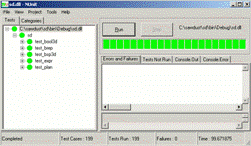 I am somewhat fanatical about unit testing and code
coverage. The screen dumps to the right show the most recent results from
running the unit tests in the core library of my hobby project [footnote: sd].
As you can see, all my unit tests are passing and my code coverage right now is
100%. This library consists of 12,341 lines of algorithms, plus 5,819 lines of
unit tests.
I am somewhat fanatical about unit testing and code
coverage. The screen dumps to the right show the most recent results from
running the unit tests in the core library of my hobby project [footnote: sd].
As you can see, all my unit tests are passing and my code coverage right now is
100%. This library consists of 12,341 lines of algorithms, plus 5,819 lines of
unit tests.
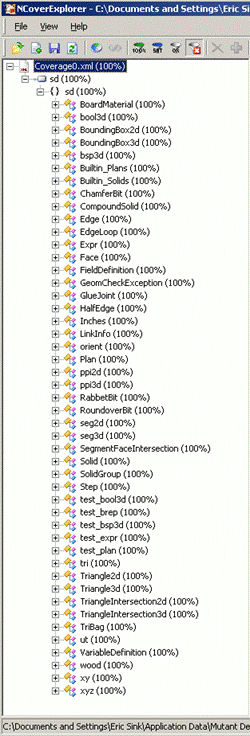 And yes, I'm feeling rather smug about my code coverage
being at 100%. :-)
And yes, I'm feeling rather smug about my code coverage
being at 100%. :-)
Code coverage is a controversial subject. Gurus have been debating the related issues for decades. I won't pretend to be one of those experts, but I see no reason not to pass along a few thoughts from my own experience in this area.
What is code coverage?
A code coverage tool simply keeps track of which parts of your code get executed and which parts do not.
Usually, the results are granular down to the level of each line of code. So in a typical situation, you launch your application with a code coverage tool configured to monitor it. When you exit the application, the tool will produce a code coverage report which shows which lines of code were executed and which ones were not. If you count the total number of lines which were executed and divide by the total number of lines which could have been executed, you get a percentage. If you believe in code coverage, the higher the percentage, the better. In practice, reaching 100% is extremely rare.
Did I mention how smug I'm feeling? :-)
The use of a code coverage tool is usually combined with the use of some kind of automated test suite. Without automated testing, a code coverage tool merely tells you which features a human user remembered to use. Such a tool is far more useful when it is measuring how complete your test suite is with respect to the code you have written.
What should the coverage goal be?
Some folks would say that a goal of 100% coverage is pathological. They have a point.
As you write more and more tests and your coverage number gets higher and higher, you start experiencing the law of diminishing returns. Those last few percentage points are tough to hit. It can take a lot of effort to come up with enough unit tests to get all the way to 100 percent. Lots of successful projects have been done with test suites that cover only 85-95 percent of the code. [footnote: none]
Others would argue that the goal should always be 100% coverage and no less. Personally, I would stop short of such a recommendation, but for this particular project of mine, getting full coverage has been worth the effort.
Raising the percentage
How did I get to 100%?
First, let me give credit to the fine tools I've been using:
- For my unit tests, I am using NUnit.
- For measuring code coverage, I am using NCover.
- For viewing the results, I am using NCoverExplorer.
- For integrating all these things with Visual Studio 2005, I am using TestDriven.NET.
The truth is that 100% coverage was not my goal. I have generally tried to keep the percentage anywhere above 95. But every so often I would just add another unit test when I didn't feel like coding a new feature. When I got to 99%, I started wondering what it would take to get all the way to 100.
Whatever your goal, the basic technique for increasing your code coverage isn't rocket science. Here's what I did:
- Look at some code which is not being tested.
- Think about how to reach that code.
- If the code can be reached, write a test case to make it happen.
- If the code can never actually be reached, then it's not needed. Remove the code and put in some kind of an assertion to make sure.
Repeat these steps until your coverage level is where you want it to be.
Forced code reviews
One of my favorite things about code coverage is that it forces you to look at your code. All too often we write code and nothing but a compiler ever looks at it again.
In fact, were I to argue that everyone should have 100% code coverage as their goal, I would build my argument on two main points:
1. Getting your code coverage to 100% will force you to review the parts of your code which probably need to be looked at.
2. If you just can't find a way to get your coverage to 100%, there's a good chance that the uncovered part of your code is simply wrong in some way.
I'm too much of a pragmatist to make that argument, but it tempts me. :-)
In my case, code coverage forced me to look at my code and realize that some of my coding practices weren't very smart. For example, consider the following snippet:
if
(condition1)
{
return result1;
}
else if (condition2)
{
return result2;
}
else if (condition3)
{
return result3;
}
In this case, suppose that I know for certain that one of the three conditions (condition1, condition2 or condition3) must be true. It should be impossible for the code to fall through all three of these if statements. Unfortunately, my C# compiler doesn't know that, and it gripes about the fact that not all code paths return a value. So I append the following:
else
{
throw new Exception("Should Never Happen");
}
Now the compiler is happy, but my code coverage tool is not. Unsurprisingly, the line which contains the string "Should Never Happen" never actually gets executed.
Throwing an exception isn't really the best way to handle a situation which should never happen. That's what assertions are for:
if
(condition1)
{
return result1;
}
else if (condition2)
{
return result2;
}
else
{
Debug.Assert(condition3);
return result3;
}
Instead of checking for condition3 explicitly with an if statement, I simply assume that condition3 must be true when both condition1 and condition2 were found to be false. And to be safe, I throw in a Debug.Assert so in my non-release builds I will get a big ugly dialog box if the unthinkable happens and all three conditions are actually false.
Now I can get full code coverage of this snippet by simply writing unit tests which cause all three conditions to happen.
But increased code coverage of this snippet is not the only result of my efforts. The other good news is that my revised snippet is simply better. It is smaller and faster. [footnote: perf]
Regression testing
Code coverage and automated testing go hand-in-hand. In my experience, the most important benefit I have gained from applying these disciplines together is regression testing.
Regression testing is simply the act of testing to see if your code somehow got broken. The code used to work, but now it doesn't. It has regressed. When this lamentable situation happens, we want to know about it as quickly as possible.
All experienced developers know that even though every code change is well-intentioned, every code change carries the risk of consequences that were not intended. Code tends to get brittle, and then it breaks when we try to bend it.
I cannot imagine trying to build a solid modeling engine without a comprehensive suite of automated tests. For example, one of the most troublesome areas of my project is performing intersection operations on 3D objects. When my app wants to drill a hole in a board, it constructs a cylinder, positions it inside the board, and performs a "subtract" operation. In getting this code to work, I have seen a seemingly endless stream of special cases. Very often when I fixed the code to handle a new situation, it broke something that was previously working just fine. Without unit tests and code coverage to tell me when my code regressed, I suspect I would simply churn forever in an endless game of whack-a-mole.
Different circumstances
I suspect that now at least one of my readers is asking, "How can automated testing and code coverage possibly be important when neither of them is mentioned on The Joel Test?" :-)
I'll admit that automated testing and code coverage are more important for some projects than for others. My library of computational geometry algorithms is a natural place to apply code coverage and automated testing. Most of my test cases are very straightforward.
- Create a 3D model of a 5-inch cube.
- Verify that the volume is 125 cubic inches.
- Create a model of a 3-inch cube.
- Subtract it from the other one.
- Verify that the resulting model's volume is 98 cubic inches.
These are algorithms. They don't really have any outside dependencies. They are either correct or they are not. External dependencies and oddball technologies make automated testing harder:
- I am currently not testing the GUI sections of my code, so I don't have to complain about TestComplete not having WPF support yet [footnote: aqa].
- My library doesn't use networking or I/O of any kind, so I don't have to deal with setting up servers.
- My code is all C#, so NCover just works well for me and I don't have to wonder if there are any code coverage tools for T-SQL or VBA.
So I acknowledge that code coverage will not fit all scenarios quite as nicely as it fits mine. If code coverage deserves to be on the Joel Test, it is certainly less deserving than something like source control. I can imagine a situation where a smart team might choose not to do code coverage. I cannot picture any team that chooses not to use source control without thinking of them all as clueless bozos.
Still, I believe that most of the time, anything you invest in automated testing will produce worthwhile returns. [footnote: invest]
Fooling yourself
Every now and then, I meet somebody who thinks that a body of code is perfect if its unit tests all pass with 100% code coverage. This obviously isn't true. Code coverage can only tell you how much of your code is being tested. It cannot tell you how much code you still need to write.
And in turn, some folks think that because 100% code coverage cannot be understood to mean 100% correctness, then code coverage isn't worth anything at all. To me, that's like saying we should never talk about the temperature outside because by itself it is not a reliable way of determining how nice the weather is.
Unit testing and code coverage are tools. They provide us a way of increasing the quality of our code, but 100% code coverage certainly does not mean 100% code quality. If you want a complete QA effort, one which offers you high confidence that your code is reliably doing whatever you want it to do, then unit testing and code coverage are just a small part of the story. There are many other tools and techniques you should consider.
Covering without testing
For some parts of my code, I was diligent. I wrote unit tests that were deliberately designed to exercise all the cases I could think of. For example, I have some code that calculates the intersection of two 2D polygons. One of my unit tests for this code contains a bunch of different situations involving two rectangles:
- Two rectangles that are far apart
- Two rectangles that share an edge
- Two rectangles that share a vertex
- Two rectangles that intersect with no overlapping edges and no shared vertices
- Two rectangles, one inside the other, sharing part of an edge
- Two rectangles, one inside the other, sharing part of two edges
- Two rectangles, one inside the other, sharing part of three edges
- Two rectangles that are really the same rectangle
- Two rectangles, one inside the other, but they don't touch
In this situation and several others like it, I practiced Test Driven Development. I wrote the test cases first and then I wrote the implementation and worked on it until all the tests were green.
But I'll confess that in other situations, I am not always so thorough. Sometimes I write a unit test that does nothing but force some code to be executed with one simple case. This makes my code coverage number look good, but it doesn't really test my code very well.
For example, I have a method that takes a solid model and produces the data structures necessary for creating an animated display. In my unit tests I call this method only once. This method isn't really being exercised. The edge cases aren't being explored. I haven't written any abusive unit tests which try to cause this method to fail.
This trick is something I call "covering without testing". It's better than nothing, since I do gain the benefits of some regression testing on that method. But obviously the coverage is thicker in some places than in others.
My code coverage is 100%, but the truth is that this particular method might be robust, or it might not. I don't really know.
And if you thought that example was bad...
My code coverage is 100%, but there are even worse skeletons in my closet. Specifically, I know of one piece of code which is definitely not robust. Furthermore, it's probably an order of magnitude slower than it needs to be.
For the rest of this particular story, see my guest entry over on The Daily WTF which ran on 14 September 2006. Alex Papadimoulis was on vacation. I was honored that he asked me to be guest editor for a day, so I wrote up something on a piece of my computational geometry code which is really quite heinous.
But hey, my code coverage is 100%, right? :-)
Bottom Line
Like I said, I am somewhat fanatical about automated testing and code coverage. I enthusiastically recommend using them.
But use them wisely. Testing guru Brian Marick said it best: Code coverage tools are "only helpful if they're used to enhance thought, not replace it" (PDF).
Footnotes
[sd] My hobby project is a solid modeling application for woodworkers. Sorry, I'm not ready for anybody else to see it yet.
[none] Heck, lots of successful projects have been done with no code coverage discipline at all. That doesn't mean the category needs more entries.
[perf] If you are inclined to argue my claim that the code is faster, consider the possibility that it might be quite expensive to check condition3.
[aqa] To Drew Wells at AutomatedQA: You guys are going to support WPF someday, right? ;-)
[invest] I chose carefully when I used the word "invest". The truth is that it is not trivial to build a really good automated testing suite. I have written 5,819 lines of code which don't do anything at all. Almost one third of my code adds no functionality to my app.